Appearance
微信公众平台
微信 H5 是微信公众平台的一部分
微信公众平台:https://mp.weixin.qq.com/
微信公众平台开发文档:https://developers.weixin.qq.com/doc/offiaccount/Getting_Started/Overview.html
全局错误返回码 https://developers.weixin.qq.com/doc/offiaccount/Getting_Started/Global_Return_Code.html
在线测试的平台 http://mp.weixin.qq.com/debug/
公众平台测试账号 http://mp.weixin.qq.com/debug/cgi-bin/sandbox?t=sandbox/login&token=1401981393&lang=zh_CN
server
OpenID 与 UnionID
access_token
https://developers.weixin.qq.com/doc/offiaccount/Basic_Information/Get_access_token.html
调取 微信 API 时候,需要 access_token。
access_token 有效期为 2h,过期将失效,需要自己保管和申请。
access_token 的申请次数一天是有限制的。
申请新的 access_token 旧的不会马上生效,而是会有 5 分钟的有效期。
access_token 获取示例
这里只截取了核心代码
ts
import { Config, Inject, makeHttpRequest, Provide } from "@midwayjs/core";
import * as querystring from "querystring";

const WX_API_URL = {
  getAccessToken: "https://api.weixin.qq.com/cgi-bin/token",
};

const querys = querystring.stringify({
  grant_type: "client_credential",
  appid: this.wx.mp.appid,
  secret: this.wx.mp.secret,
});

// {"access_token":"ACCESS_TOKEN","expires_in":7200}
// {"errcode":40013,"errmsg":"invalid appid"}
const res = await makeHttpRequest<any>(
  `${WX_API_URL.getAccessToken}?${querys}`,
  {
    method: "GET",
    dataType: "json",
  }
);

const { errcode, access_token, expires_in } = res.data;公众号网页 配置
https://developers.weixin.qq.com/doc/offiaccount/Basic_Information/Access_Overview.html
公众号网页 > 服务器配置 ,中配置的 Token 是生成签名用的
在 “验证 URL 有效性” 中,微信会请求你配置的 URL,然后发送 signature,echostr,timestamp,nonce 这几个参数
signature = sha1( Token + timestamp + nonce )
注意,这个 Token 就是你在微信网页端设置的!
注意,sha1 前参数需要按字典进行排序!
如果验证成功,就说明这次 Http 请求是微信发的
那么这次 Http 请求需要返回 echostr 给微信,就代表验证成功。
微信验证 URL 有效性
微信提供调试工作 https://developers.weixin.qq.com/apiExplorer?type=messagePush
ts
  @Get('/mp/verify')
  async wx(@Query() params: IWxVerifyRequest) {
    const { nonce, timestamp, signature, echostr } = params;

    const token = this.wxService.getToken();
    if (!token) {
      MyError.server('微信 token 没有配置');
    }

    const list = [token, nonce, timestamp];
    list.sort();

    const hash = hash_sha1(list.join('')); // join 默认是,所以这里一定要 ''

    if (hash === signature) {
      return echostr;
    }

    return {
      sort: list,
      hash,
      signature,
    };
}加密就是 hex
ts
export const hash = (
  data: string,
  algorithm: string,
  encoding: BinaryToTextEncoding = "hex"
) => {
  const hash = crypto.createHash(algorithm);

  hash.update(data);

  return hash.digest(encoding);
};

export const hash_sha1 = (data: string) => hash(data, "sha1");h5
样式指导 https://weui.io/
依赖(非官方)
pnpm add add weixin-js-sdk-ts公众号开通 js sdk
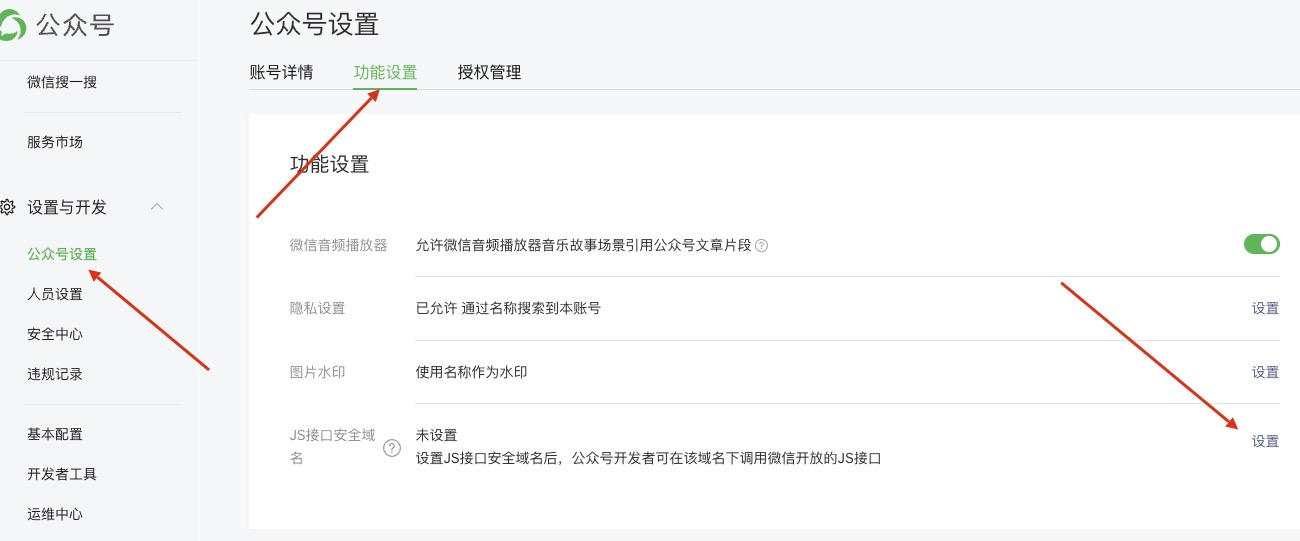
关于 js 安全验证文件 在 nginx 下的配置
location ~* \.(txt)$ {
    root /data/www/gm_static/mp;
}h5 config
详见 附录 1-JS-SDK 使用权限签名算法
jsapi_ticket 是通过 access_token 获取的,规则与 access_token 一样。nonceStr 是随机字符串,需要自己生成。timestamp 是时间戳,单位是秒,需要自己生成。url 是当前网页的 URL,不包含 # 及其后面部分。
signature 是对 jsapi_ticket、noncestr、timestamp、url 组装后进行 sha1 签名
代码示例
https://api.weixin.qq.com/cgi-bin/ticket/getticket?type=jsapi&access_token=ACCESS_TOKEN
ts
 async h5config(url: string) {
    const jsapi_ticket = await this.getJsApiTicket();

    const noncestr = createUUID();
    const timestamp = Math.trunc(Date.now() / 1000);

    const list = [
      `jsapi_ticket=${jsapi_ticket}`,
      `noncestr=${noncestr}`,
      `timestamp=${timestamp}`,
      `url=${url}`,
    ];
    list.sort();

    const string1 = list.join('&');

    const signature = hash_sha1(string1);

    return {
      appId: this.wx.mp.appid,
      timestamp,
      nonceStr: noncestr,
      signature,
    };
}api / rid
用于获取错误信息
微信 API 域名
通用域名(api.weixin.qq.com),使用该域名将访问官方指定就近的接入点;
通用异地容灾域名(api2.weixin.qq.com),当上述域名不可访问时可改访问此域名;
上海域名(sh.api.weixin.qq.com),使用该域名将访问上海的接入点;
深圳域名(sz.api.weixin.qq.com),使用该域名将访问深圳的接入点;
香港域名(hk.api.weixin.qq.com),使用该域名将访问香港的接入点。