Appearance
关于登陆
server 项目是 copy 的之前的项目,所以存在密码登录,但是 奥体项目 没有 密码登录,而是 验证码登录 与 微信登录
密码登录 是可用的,一般用于 开发环境
用户进入 H5 就会使用 微信静默登录/snsapi_base获取用户 OpenID
而登录是通过 授权登录/snsapi_userinfo 实现的
当用户点击微信登录就会跳转至微信服务器
ts
const { origin, pathname, hash } = window.location
const redirect_uri = encodeURIComponent(`${origin}${pathname}${hash}`)

const url = getWxAuthURL({
  appid: 'wxa9462c49dd468b45',
  redirect_uri,
  scope: 'snsapi_userinfo',
  response_type: 'code',
  state
})

console.log('微信登录 redirect_uri > ', redirect_uri)
console.log('微信登录 url > ', url)

window.location.href = url这里有一个非常严重的问题,微信返回的数据格式为:
url
http://www.cqzmi.com/u/?code=051s4s000k6f8T1f1I000YFPBj3s4s0R&state=#/home这是因为 Nginx 部署为 Hash 模式造成的,所以需要对其进行处理。
IOS 和 Android 都可以通过 window.history.replaceState 完成对路由的处理
sh
window.history.replaceState(null, '', `${origin}${pathname}${hash}`)IOS 会改 URL,但是实际不会变,所以会导致奇怪的问题。最后只能让 IOS 设备刷新解决
ts
 setToken(token)

 if (isIOSerAgent()) {
   // IOS 需要单独处理
   // IOS 刷新页面前,需要先恢复页面,在刷新
   handleRouteOnWxLogined()
   setTimeout(isIOSRefresh, 600)
 }

/**
 * 是否为 iOS 浏览器
 */
export function isIOSerAgent() {
  return /iPhone|iPad|iPod/i.test(navigator.userAgent)
}

export function isIOSRefresh() {
  const { origin, pathname, hash } = window.location

  console.log('window.location > ', window.location)
  console.log('目标 url > ', `${origin}${pathname}${hash}`)

  window.location.href = `${origin}${pathname}${hash}`
  window.location.reload()
}同样,Android 也不太平。
通过 微信登录后,本质上是对页面进行了刷新。
此时的第一个页面是 登陆页 ,在登录成功后会直接前往 redirect 。
大部分情况都是拥有 redirect 的,那么此时返回 会返回 Login 页面,而不是 Home。
现在使用最简单的方式完成
ts
const handleRouteOnWxLogined = () => {
   const redirect = route.query.redirect

   // 先去 Home 然后在 redirect 对应界面
   router.replace({ name: 'home' })

   if (redirect && typeof redirect === 'string') {
     setTimeout(() => {
       router.push(redirect)
     }, 500)
   }
}流程
2024-11-04
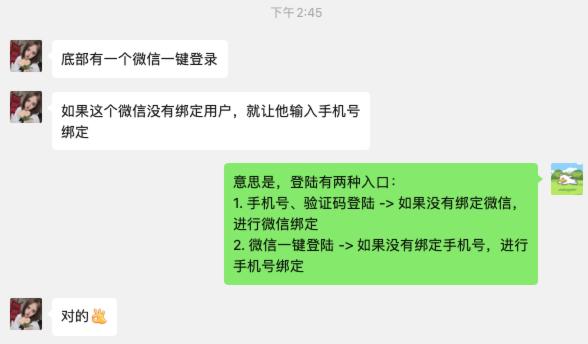
因为后端使用了静默登录,所以后来就砍掉了 手机号登录后 绑定微信的流程
协议